Drowning in tasks. Weeks slip by.
Progress stalls.
Finally, a self-cleaning workflow system — that lets business owners focus on growth instead of fighting chaos.
A ready-made work system, built inside Notion
Your system shouldn’t fall apart when life gets messy.
You’re not disorganised. LifeSync Hub gives you one place to see what matters now, what can wait and what needs attention—without rebuilding your setup every week.
Hear what changed for three business owners.
Swipe to watch more customer stories →
“I can have a really good look at whether or not I’ve stretched myself too thin if I’ve got too many projects on the go.”
“It’s super intuitive… a good balance between simplicity and usefulness, and it’s not overwhelming like other systems.”
“It’s changing my life… It’s not hard to learn.”
Why the week feels heavier than it should
Your system makes you hold everything together.
The tasks are in one place. Project notes are somewhere else. New ideas land in your phone. Everything looks important, so the week gets decided by whatever shouts loudest.
- I work all day and still feel behind.
- Everything feels urgent, so I react instead of choosing.
- I keep rebuilding the plan instead of doing the work.
- If I do not remember it myself, it disappears.
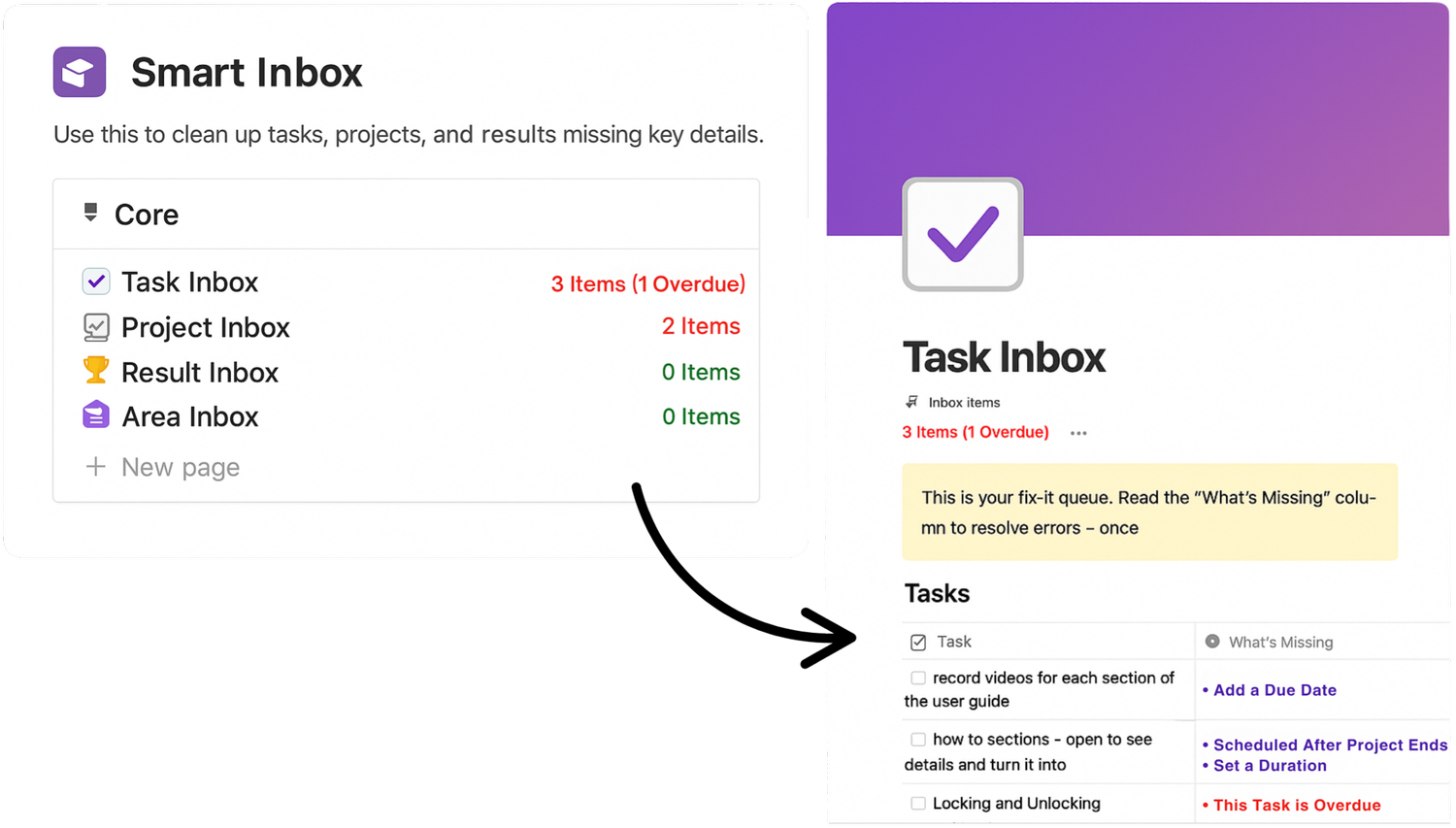
Smart Inbox shows the work that needs attention before it disappears into the system.
Open one place. See what matters. Know where to move next.
LifeSync does three useful things your current setup leaves you to remember.

Connect today’s work to a result.
Every task can lead back to the project, result and area it supports. That gives the work a reason—and makes low-value busywork easier to see.
- See why a task matters
- Spot projects that have drifted
- Keep the big picture connected to today
Swipe to see both recovery views →

Keep “not now” out of today.
Active and Backlog views let you narrow the work in front of you without deleting the things you want to return to later.
- Make active commitments visible
- Keep future work safe in Backlog
- Reset after a difficult week without starting again
Catch what would normally disappear.
Smart Inbox surfaces loose, incomplete and overdue work so you know what needs fixing before the workspace becomes another mess.
- Capture first and organise later
- See what information is missing
- Repair the system before you stop trusting it
Proof across three starting points
Whether you’re new to Notion or have used it for years, the goal is the same: a system you can trust.

“Now I know what I’m working on each week… It’s honestly taken a huge weight off.”

“If life gets in the way, I don’t really have a way to compensate for that inside my task management system, but LifeSync Hub does that for me.”

“It’s helped spread out the work so the team’s less stressed, and we’re actually ahead of schedule for once.”
Read 12 featured customer reviews
Remove the mystery before you buy
See the full system before you decide.
This practical 13-minute walkthrough shows the homepage, the connected structure, the planning flow and what you will actually receive.
- The real workspace—not a mock-up
- How the databases work together
- What setup looks like after checkout
What you receive
Everything you need to make the system useful—and keep it useful.
A complete workspace, a guided first workflow and personal help with Pro—all delivered inside your own Notion account.
Swipe to see the system, setup and Pro extras →
One connected workspace
- Areas, Results, Projects and Tasks
- Active / Backlog and Focus views
- Smart Inbox
- Weekly Workload Planner
A clear first workflow
- Instant Gumroad delivery
- Duplicate it into your Notion account
- Step-by-step onboarding walkthrough
- No database or formula building
More depth and direct help
- Connected Notes & Notebooks Hub
- Native recurring-task logic
- Lifetime product updates
- 90 days of email and Loom support
Value without a setup project
Set up a working LifeSync system in under 30 minutes.
Start with the guided core workflow, then add depth only when it becomes useful.
No coding. No formulas to write. No Make, Zapier or OpenAI connection required.
Gumroad gives you the access link immediately after checkout.
Add your first Area, Result and active Projects with the walkthrough beside you.
Use the focused views—and return to Smart Inbox whenever the system needs attention.

Built by someone who builds systems for a living
I needed a system I could trust too.
I have spent more than a decade building data, analytics and operational systems for banks, trading desks and businesses. But my own work was still spread across different tools, and I was tired of repairing the system that was supposed to help me.
That is why LifeSync is structured around a simple idea: keep the work connected, keep today’s view focused, and make anything that is slipping easy to see.
Buy it once. Use it for life.
Choose the version that fits.
No membership and no monthly payment to LifeSync. Pro is the complete version; Core is the essential workflow.
Choose one version only—Pro already includes everything in Core.LifeSync Hub Pro
The complete system, future updates and personal help.
- Everything in Core
- Connected Notes & Notebooks Hub
- Native recurring-task logic
- Lifetime product updates
- 90 days of personal email and Loom support
Instant access through Gumroad · Works in your own Notion account
LifeSync Hub Core
The essential connected workflow.
- Connected Areas → Results → Projects → Tasks
- Smart Inbox
- Active and Backlog views
- Weekly Workload Planner
- 30-minute setup walkthrough
Instant access through Gumroad · The essentials only
What is not included in Core?
Core does not include Notes & Notebooks, recurring-task logic, lifetime updates or the 90-day personal support included with Pro.
Questions before checkout
Straight answers before you buy.
Do I need to know Notion?
No. You need a Notion account, but the walkthrough starts from duplication and shows the LifeSync workflow step by step. You do not build the system yourself.
What if I have abandoned templates before?
That is the problem LifeSync was designed around. Active / Backlog keeps the working view manageable, while Smart Inbox shows you what has fallen out of place. Pro also includes 90 days to ask Ghobi for help.
Will LifeSync run my work automatically?
No. It will not choose your goals or do the work for you. It gives you a connected structure, focused views and warnings so those decisions take less effort.
Is Smart Capture required?
No. Smart Capture is an optional add-on. LifeSync Hub itself works without Make, OpenAI or any external automation.
What will I pay for after checkout?
There is no monthly payment to LifeSync. You can use the core workspace on Notion’s Free plan as an individual. Notion limits some Free-plan features—including the number of native charts and file-upload size—so check Notion’s current limits if those features matter to you.
What is the difference between Core and Pro?
Core contains the essential connected workflow, Smart Inbox, Active / Backlog and Weekly Workload Planner. Pro adds Notes & Notebooks, recurring-task logic, lifetime updates and 90 days of personal support.
Will it fit my business?
LifeSync is designed for solo operators, professionals and small teams managing several projects. It is not an enterprise project-management implementation or a bespoke service.
Can I see the onboarding before I buy?
Stop rebuilding your system. Start trusting it.
See what matters, keep future work safe and catch what is slipping—inside one connected workspace with lifetime access.
Get LifeSync Hub Pro — $249 USD🎥 Trusted by 500+ business owners — see how LifeSync Hub beats overwhelm in just 6 minutes.
Why You’re Workload Feels Overwhelming
and How LifeSync Hub Fixes It.
Most Notion setups fall into one of two traps:
🟠 Endless lists with no structure…
🟣 Or overcomplicated dashboards you never use.
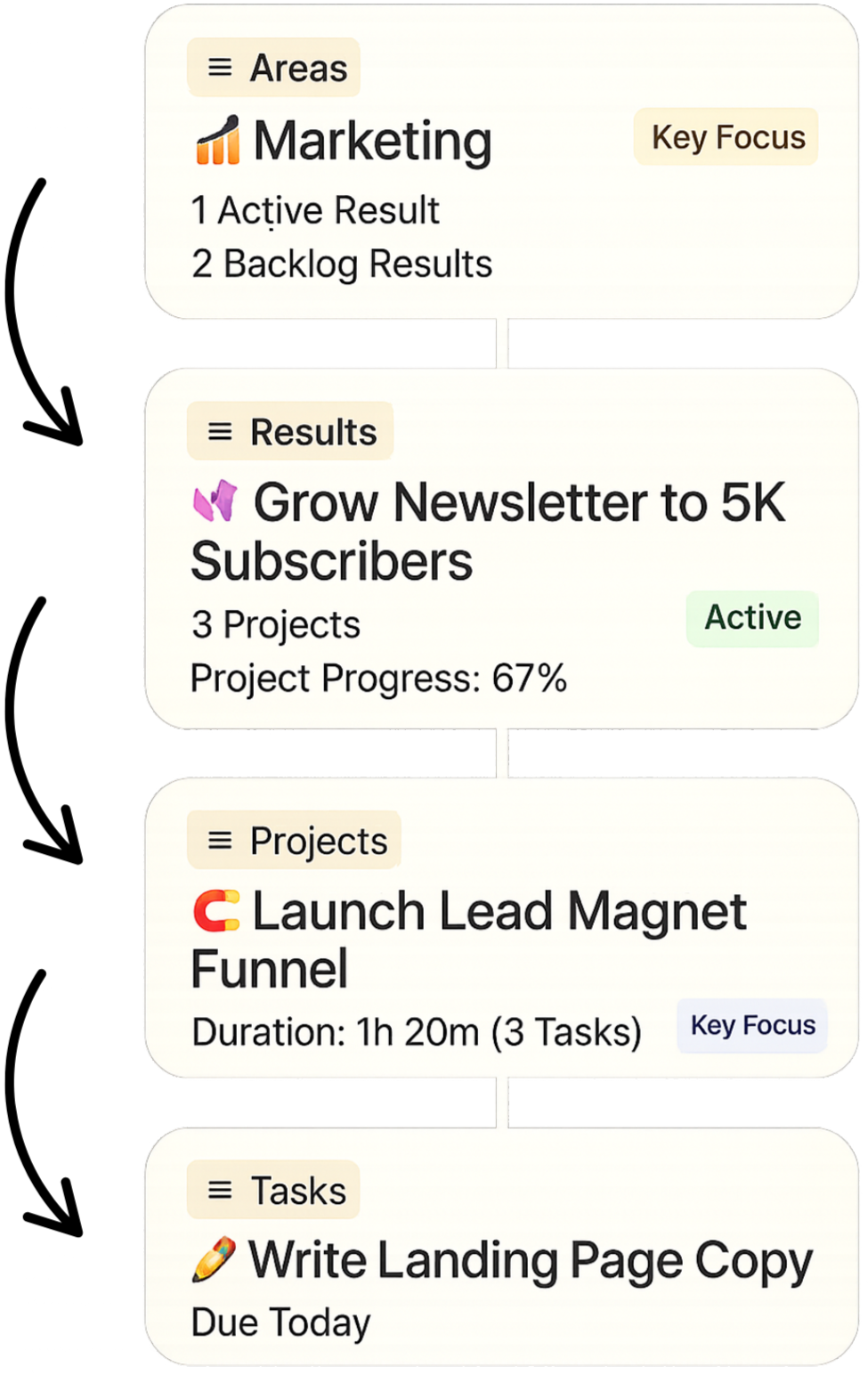
LifeSync gives you one clear flow:
Areas → Results → Projects → Tasks
So every task ladders up — and your entire week finally makes sense.
Get Organized Without Overwhelm
Fix #1
Most Notion setups look great… until real life hits.
Deadlines pile up. Tasks disappear. You fall behind - and stop trusting the setup.
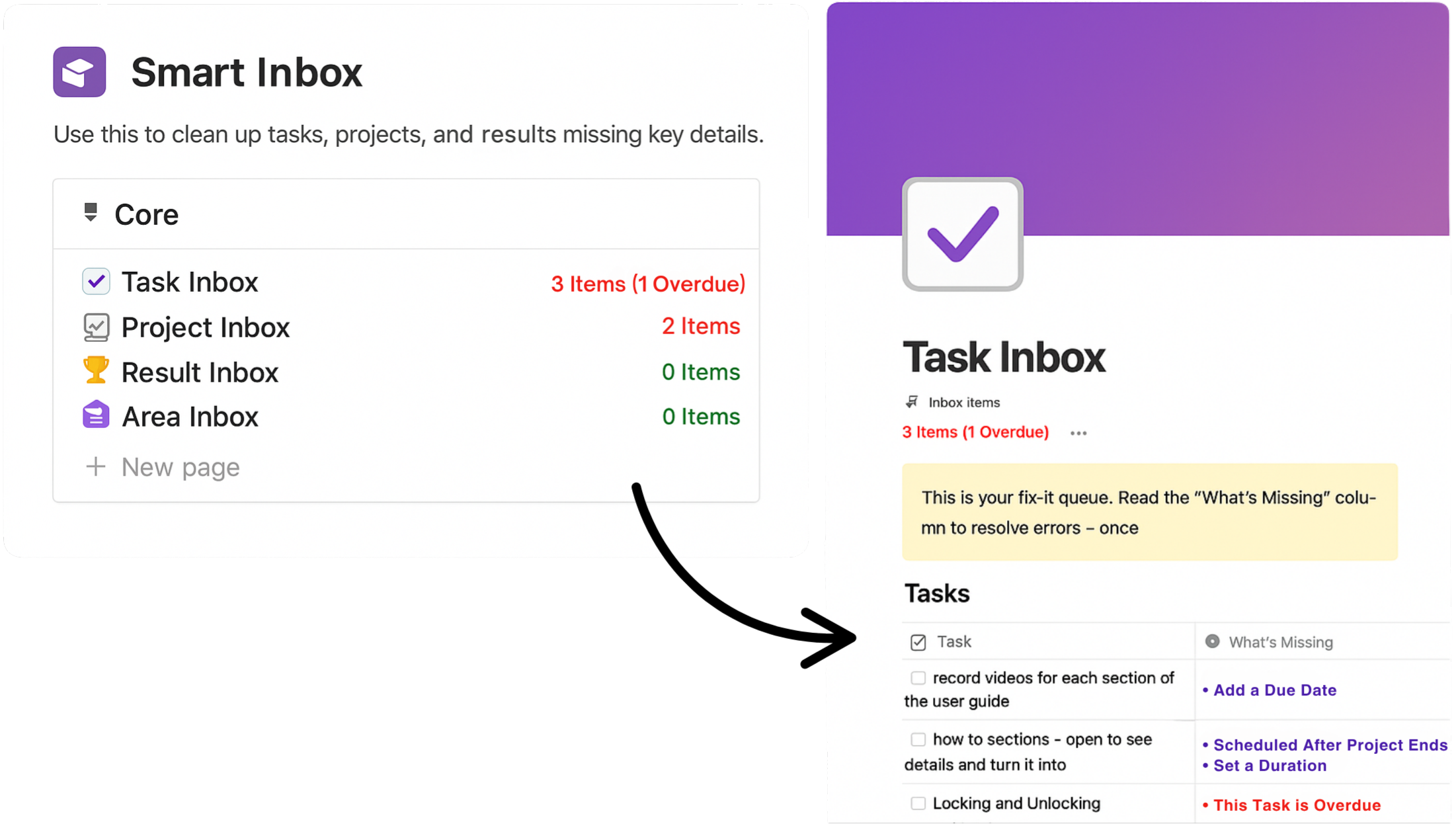
LifeSync’s Smart Inbox scans everything for you - flagging what’s broken, missing, or overdue.
So you stay clean, even when life gets messy.
It’s like having a second brain - just for staying organized.
The Smart Inbox
Fix #2
Ever open your Notion and instantly feel overwhelmed?
Projects. Ideas. Half-done tasks. Random notes. A hundred things screaming for attention.
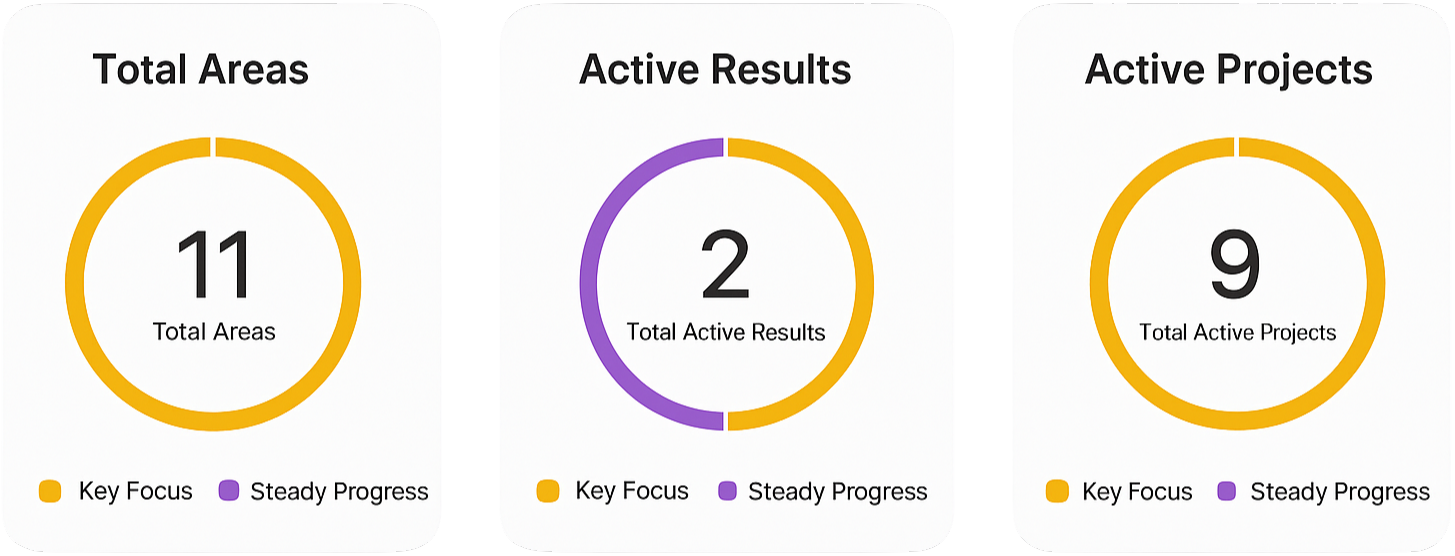
LifeSync fixes that by showing you only what matters now — and nothing else.
✅ Active vs Backlog hides anything that’s on hold
✅ Focus Levels spotlight your real priorities
It’s not just cleaner - it’s quieter.
And that makes it easier to actually move.
Work Without the Noise
Fix #3
Most Notion setups look good on day one… then you’re left to figure it out yourself.
Confusion builds, tweaks pile up - and before long, you stop using it.
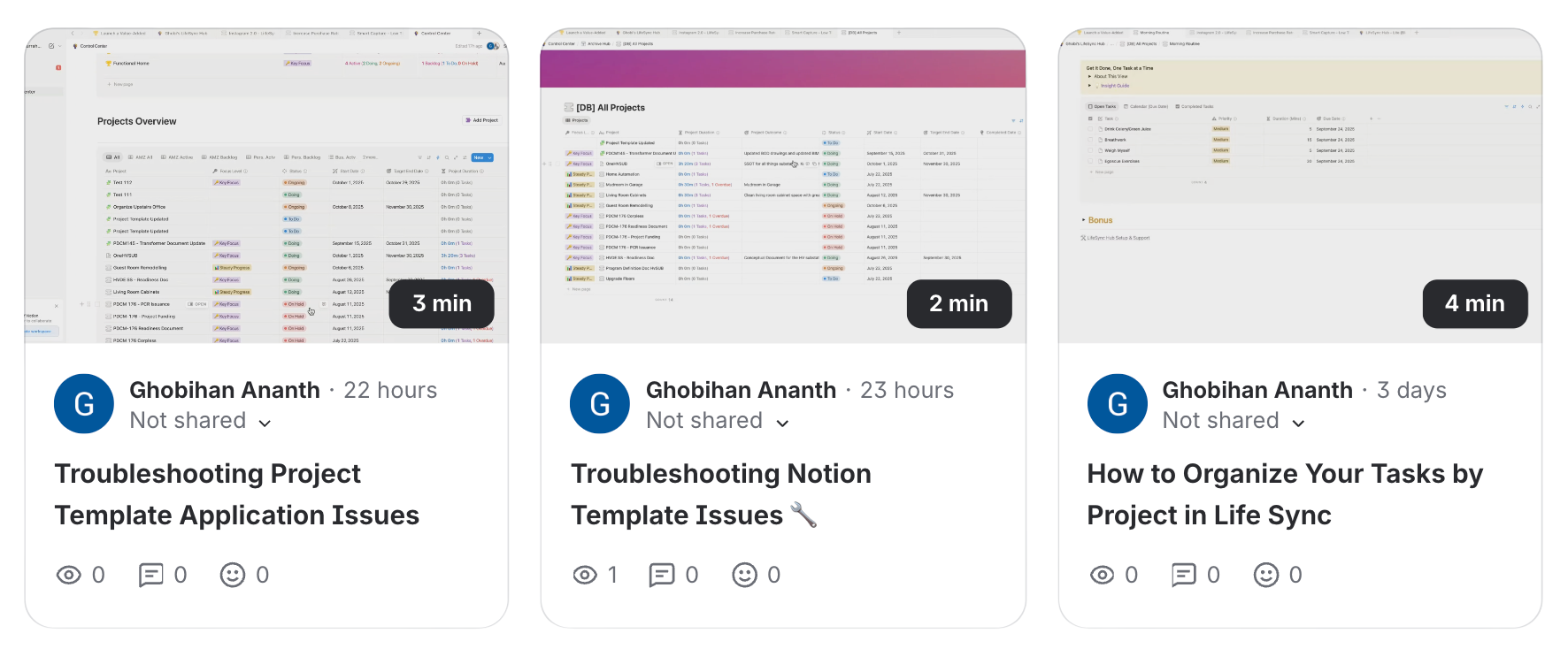
With LifeSync Hub, you get 90 days of personal support directly from me.
The part people find most valuable? Loom guidance.
Send me a quick screen recording (Loom = a free tool to record your screen and voice), and I’ll reply with a personalized Loom video guiding you through your challenge step by step.
So you’re never stuck or second-guessing.
You don’t just buy a system - you actually succeed with it.
90 Days of Personal Support from Me
Fix #4
Why You’re Workload Feels Overwhelming — and How LifeSync Hub Fixes It.
Most Notion setups fall into one of two traps:
🟠 Endless lists with no structure…
🟣 Or overcomplicated dashboards you never use.
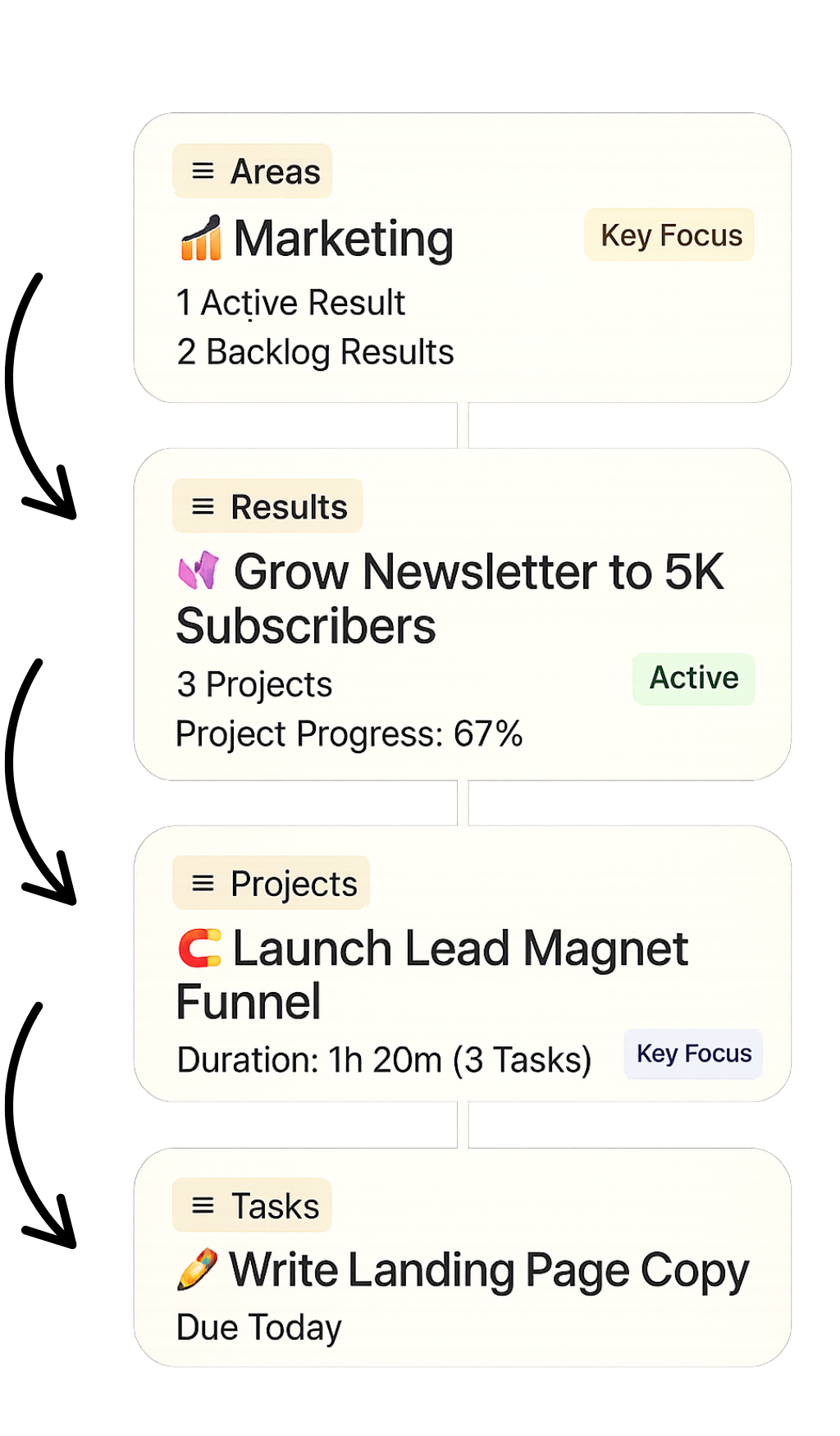
LifeSync gives you one clear flow:
Areas → Results → Projects → Tasks
So every task ladders up — and your entire week finally makes sense.
Get Organized Without Overwhelm
Fix #1
Most Notion setups look great… until real life hits.
Deadlines pile up. Tasks disappear. You fall behind — and stop trusting the setup.
LifeSync’s Smart Inbox scans everything for you — flagging what’s broken, missing, or overdue. So you stay clean, even when life gets messy.
It’s like having a second brain — just for staying organized.
The Smart Inbox
Fix #2
Ever open your Notion and instantly feel overwhelmed?
Projects. Ideas. Half-done tasks. Random notes. A hundred things screaming for attention.
LifeSync fixes that by showing you only what matters now — and nothing else.
✅ Active vs Backlog hides anything that’s on hold
✅ Focus Levels spotlight your real priorities
It’s not just cleaner — it’s quieter.
And that makes it easier to actually move.
Work Without the Noise
Fix #3
Most Notion setups look good on day one… then you’re left to figure it out yourself.
Confusion builds, tweaks pile up - and before long, you stop using it.
With LifeSync Hub, you get 90 days of personal support directly from me.
The part people find most valuable? Loom guidance.
Send me a quick screen recording (Loom = a free tool to record your screen and voice), and I’ll reply with a personalized Loom video guiding you through your challenge step by step.
So you’re never stuck or second-guessing.
You don’t just buy a system - you actually succeed with it.
90 Days of Personal Support from Me
Fix #4
— Data strategist, quant developer, and systems builder with 10+ years helping banks, trading desks, and small businesses.
Created by Ghobi Ananth
LifeSync Hub is the opposite.
The more projects, deadlines, and moving parts you throw at it, the clearer it gets.
Because it keeps itself organized, you can finally move forward with confidence - without the constant stress of fixing the tool that’s supposed to help you.

Watch the Full Walkthrough.
See The Full System in Action Before You Buy.
(13-min Walkthrough)
Real Clients. Real Results.
Get Results Faster with 6 Bonuses.
When you grab LifeSync Hub during this offer, you’ll also get 6 built-in extras designed to guarantee success from day one.
Built right into the system.
No setup required.
Frequently Asked Questions
-
It depends on how you value your time, your focus, and your peace of mind.
Most people waste hours every week trying to stay on top of everything - switching between tools, rewriting plans, second-guessing priorities, and reacting instead of leading. And when they buy a random Notion template, they’re usually left on their own to figure it out. That’s why most setups don’t stick.
LifeSync Hub was built differently. You’re not just getting a powerful self-organizing system - you’re getting 90 days of personalized support from me to make sure you actually succeed with it. If you get stuck, I’ll help you move forward. If you’re unsure, I’ll review it with you. You’re never left to figure it out alone.
And in a world where everything is moving to monthly subscriptions, this is a one-time payment with Lifetime Access, Future Updates included, and no hidden costs.
Honestly, I could have priced it way higher. But I wanted LifeSync Hub to be a no-brainer: a complete solution that genuinely helps you beat overwhelm, without breaking the bank.
So if you’re on the fence, ask yourself:
- What’s the cost of continuing without a system that works?
- What’s the cost of wasting another 3–5 hours a week just spinning your wheels?If LifeSync Hub saves you even one hour a week, it pays for itself in days. If it helps you make one better decision, it could pay for itself ten times over.
If you need this, get it. You won’t regret it.
-
Great question and honestly, this is what makes LifeSync Hub different from every other Notion template out there.
When you buy the LifeSync Hub Pro Bundle, you’re not just getting a system - you’re also getting me in your corner for 90 days. That means if you hit a roadblock, get confused, or even just wonder if you’re setting things up the right way, you can reach out directly. Send me a quick email or, even better, a short Loom screen recording, and I’ll personally reply with a tailored Loom video showing you exactly what to do next.
This isn’t outsourced support or generic help docs. It’s real replies from me! If you scroll up and watch the testimonials, you’ll see how many people mention how much I genuinely care about helping them succeed.
Why do I take it so seriously? Because before LifeSync Hub, I built products and support systems inside investment banks and trading desks. In those environments, success wasn’t about handing someone a tool and walking away - it was about constant improvement, troubleshooting, and making sure the system worked every single day under pressure, in the way the client needs it to. That’s the same standard I bring here.
My goal is simple: I don’t want you to just “buy a template.” I want you to actually succeed with it. And I’ll do everything I can to make sure that happens.
-
Totally fair question - and genuinely, it’s the #1 reason I built LifeSync Hub the way I did.
Most templates leave you on your own. You duplicate them, poke around for a bit, and then abandon them when things stop making sense. LifeSync Hub is different.
As soon as you buy, you’ll get a unique link to duplicate the template into your own Notion account. From there, you’ll have:
✅ A full onboarding walkthrough showing you how everything works step by step.
✅ A clear “first workflow” to get started without overwhelm.
✅ 90 days of personalized support from me. That means if you get stuck, you can email me anytime or even send me a Loom screen recording — and I’ll personally reply with tailored guidance.If you scroll up and check the video reviews, you’ll see how many people mention the support as the reason they finally stuck with a system. That’s not an accident.
I don’t just want you to own LifeSync Hub. I want you to succeed with it. And I’ll do everything I can to make sure that happens.
And if you’d like to see the onboarding video before you decide, I’m happy to share it with you — watch it here: LifeSync Hub Full Walkthrough (YouTube).
-
Honestly, I get it. I’ve been there.
I tried pretty much all the popular templates too (I won’t name names out of respect). Some looked great. Some had loads of features. But none of them actually worked once things got messy. It took too much mental bandwidth just to keep things organised and usable.
That’s exactly why I built LifeSync Hub - to create a system that could handle the real-world chaos of running a business without falling apart when priorities shift or plans change.
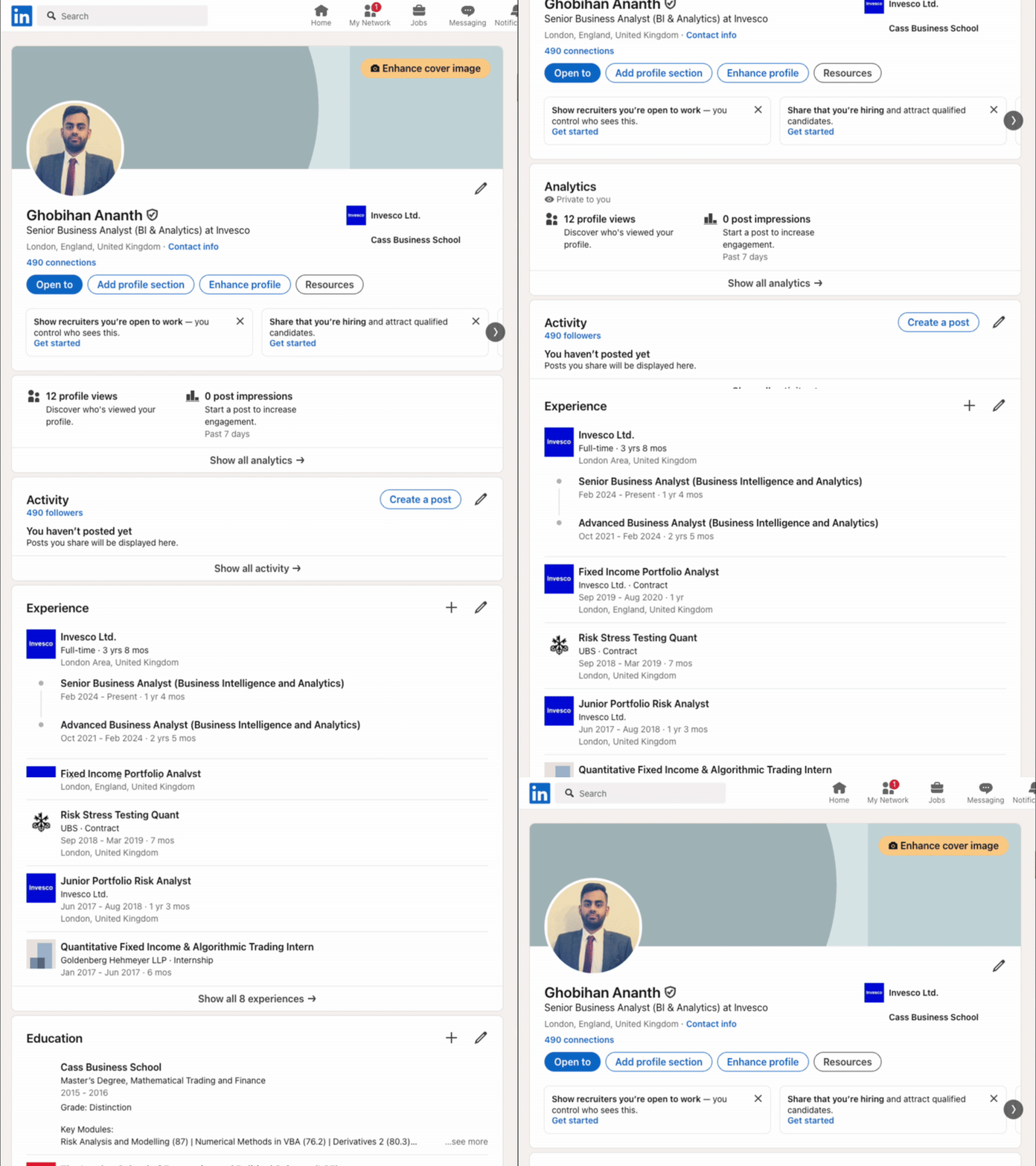
And this isn’t just a content creator side project. I’ve spent over a decade building apps, systems and tools for algo trading desks, portfolio teams, analytics teams, and small businesses. (Feel free to look me up on LinkedIn, my full name is Ghobihan Ananth.) This is what I do for a living and I genuinely care about building tools that lead to real client success.
If you decide to take a chance on LifeSync Hub, know this: I’ve poured everything I’ve learned into it. And if you ever get stuck or something doesn’t click, email me directly - I’ll do everything I can to help you get it working for you.
-
Nope. You don’t need to be a Notion expert - or even a regular Notion user.
The onboarding walks you through step by step. Most buyers start using it the same day, even if they’re new to Notion. You’ll see a few reviews above from users who were new to Notion (or even digital planning) and they’ve shared around how simple they found the onboarding experience. -
When you go through checkout on Gumroad, you’ll see a one-time option to add Smart Capture for just $34 (normally $97). It’s not listed on this page because it’s an optional upgrade.
🔎 See it in action (90-second YouTube demo):
https://lifesynchub.com/smart-capture🎤 Voice → Tasks in seconds: Brain-dump on iOS/Android; tasks show up pre-formatted in Notion.
⚡ Inbox-ready: They land structured for your Smart Inbox to triage instantly.
🚀 Fast setup: Guided walkthrough; most people are live in ~20 minutes.
💸 Near-zero ongoing cost: Make.com (free plan) + a few cents/month in OpenAI credits.
📦 What you get: iOS Shortcut & Android workflow, a Make.com scenario pre-configured for LifeSync Hub, copy-paste field mapping, short setup video & troubleshooting help.
👉 Note: LifeSync Hub works great without it! Smart Capture just makes getting things out of your head instant.
-
If you’re a solo operator, freelancer, creator, or small team juggling multiple priorities - absolutely.
LifeSync Hub is designed to flex around how you work. Whether you’re running a service business, building an online brand, managing multiple clients, or growing something new - this system helps you stay in control without drowning in complexity. -
When I release updates, they come in two forms:
1) Smaller tweaks or improvements:
For smaller changes (like new views, optimisations, or feature upgrades), I’ll share a short video and written instructions via Gumroad - that’s where your purchase lives, and you’ll automatically get update emails from there. You’ll see exactly what’s changed and how to implement it manually in your own setup, if you want to.
For example, when Notion changed their free plan to only allow one chart per page, I created an alternate version of the scorecards that shows the same data in a list view and recorded a walkthrough video showing how to add it in.
2) Major redesigns or rebuilds
If I release a big system update that changes the structure significantly (like when I added the Smart Inbox), I’ll send out a fresh copy of the full template. I’ll also explain how to migrate your data over if you want to use the new version or you can keep using your existing setup if it’s working for you.
Either way, you’ll always have access to the latest version, and I’ll make sure you’re not left guessing what’s changed or how to apply it.
🎥 Got a Question? I’ll Send a Loom Back.
Wondering if LifeSync Hub fits your workflow? Email me your question (or a quick screen recording), and I’ll reply with a short Loom - a personal video walkthrough showing exactly what I’d do for your case.

Tip: If you include a short Loom of your current setup, I can be laser-specific in my reply. (But it’s totally optional.)
📩 Email Me - Get a Loom Reply
– Ghobi
System Builder, Client Helper, Awkwardly Human 👋
Smart Capture → Voice to Notion Tasks
Speak a quick brain dump on your phone and watch structured tasks (title, due date, duration, priority) land in your Notion — automatically.